
 Saudi Arabia
 Bahrain
 QatarComing soon
 United Arab EmiratesComing soon
 KuwaitComing soon
 OmanComing soon
Customer follow-up tool · free
Customer follow-up tool A free lead tracker
Open an Excel or CSV file in your browser and work it one business at a time: status, note, follow-up date and one-tap calls. No account, and the file never leaves your device.
Start here
Open your list, or try it first
You have a file
Open your list file
Choose the Excel or CSV file you downloaded from “My lists” or from the sample email, or drag and drop it here.
The file is read here in your browser and saved on your device only. It's never uploaded, and we never see it.
No file needed
See the tool at work
A sample list with made-up names and numbers. Mark statuses, write a note, set a follow-up date, and leave with one click. Nothing from it is saved.
Lists open on this device
No list yet? Ask for a free sample, download it from your email, and open it here.
This is a sample list with made-up names and numbers: try the statuses, notes and follow-ups as you like. Nothing from it is kept; when you're done, open your own list's file.
Finished the list? See the lists near it and keep going.
Number cleaner
Take out your current clients
Paste your clients' numbers, one per line, or open their file (Excel or CSV). We match by number and hide the matches from the list. Their numbers stay on your device.
Done trying? Leave and open your list file.
Your marks and notes are saved in this browser on this device only. To keep a full copy, export to Excel from “All businesses” with no filters now and then.
Ready lists
Want new customers to follow up?
These lists hold the most mobile numbers. Each is an Excel and CSV file, sorted by sub-category.
Every list by activity
- RestaurantsAll of Saudi ArabiaRiyadhJeddahMadinahMakkahDammamAt TaifAl KhobarBuraidahTabukAl AhsaKhamis MushaytHailNajranAbhaAl QatifAl JubailJazanArarSakaka
- CafesAll of Saudi ArabiaRiyadhJeddahMadinahMakkahDammamAt TaifAl KhobarQassimAl AhsaAbhaBuraidahKhamis MushaytTabukHailNajranAl JubailSakakaUnayzahJazanArar
- Groceries and supermarketsAll of Saudi ArabiaRiyadhJeddahDammamMakkahMadinahAl Khobar
- Bakeries and sweetsAll of Saudi ArabiaRiyadhJeddahDammamBuraidahMakkahMadinahAl KhobarAt TaifTabukAl AhsaKhamis MushaytHailUnayzahAbhaNajranSakaka
- Contracting companiesRiyadhJeddahDammamAl KhobarMadinahMakkah
- Real estate officesJeddahDammamMadinahAl Khobar
- Hospitals and medical centersAll of Saudi ArabiaRiyadhJeddahMakkahMadinahDammamAt TaifBuraidahAl KhobarHailKhamis MushaytAbhaNajranJazan
- Online storesAll of Saudi Arabia
- Factories and plantsRiyadhJeddahDammamMadinahAl KhobarBuraidahMakkahAt TaifHafar Al BatinKhamis Mushayt
- Hotels and resortsRiyadhMakkahJeddahMadinahDammamAl Khobar
- Law firmsRiyadhJeddahMakkahMadinahDammamAl Khobar
- Engineering officesRiyadhJeddahDammamAl KhobarMakkahMadinah
- Marketing and advertisingJeddahDammamAl KhobarMadinahBuraidahHailAt TaifKhamis MushaytTabukAl Jubail
- Schools and kindergartensAll of Saudi ArabiaRiyadhJeddahMakkahMadinahAt TaifDammamBuraidahAl KhobarHailTabukNajranKhamis MushaytAl AhsaAbhaAl KharjAl JubailUnayzahSakakaArarAl Qatif
- Barber shopsHail

Customer follow-up tool: a free lead tracker that opens your list file in your browser
A lead tracker starts with one file: who you called, who's interested, and when to call back. The Customer follow-up tool is free: it opens your list file in the browser so you can work it one business at a time, with no account, and without the file ever leaving your device. Here's how it works, who it suits, and how to get the most from it before you open your own list.
In short
- Open your list file in the browser, and every business becomes a row with a status, a note and a follow-up date.
- “Today” gathers what's due and what's overdue, and a bar above the list shows how much of it you've worked.
- Free, with no account: the file is read on your device, and you export your work to Excel whenever you need it.
Last updated 20 November 2026
What is the Customer follow-up tool?
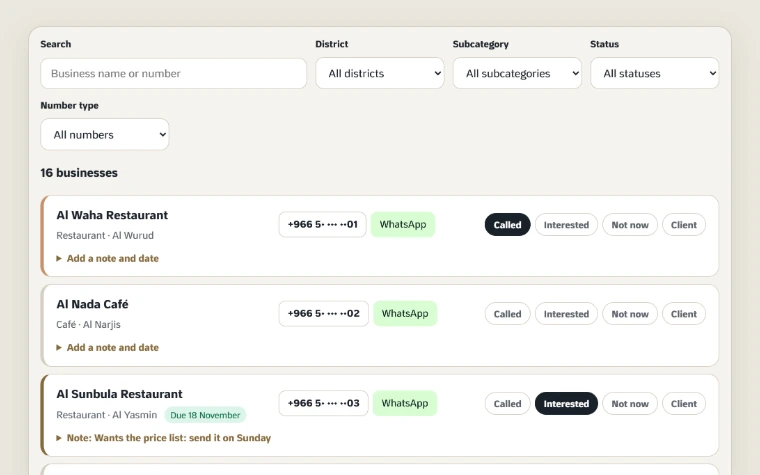
The Customer follow-up tool is a page on our site that reads your list file (Excel or CSV) and shows it as one row per business. Each row has the business's name, district, subcategory and number, plus buttons that save you time:
| On each row | What it does |
|---|---|
| Call | Starts a call to the business from your phone |
| Opens one chat with the business, when the file has a WhatsApp link for it | |
| Map, website and email | Open the business on the map, its website, or an email to it, when the file has them |
| Status | Called, interested, not now, client |
| Note and date | A line on what happened, and the day you'll get back to them |
Our list files open in it as they are. Any other Excel or CSV file opens too, as long as it has a business name or contact number column and at least one more.
Who is the Customer follow-up tool for?
| You are | How it helps |
|---|---|
| A business owner who sells | Work the list between other jobs, and never forget who you promised to call back. |
| A field rep | Filter by district, plan the day's visits, and add a note after each one from your phone. |
| A small sales team | Each rep opens their share of the list on their own device and exports their work at the end of the week. |
| Someone with an Excel file and no need for a CRM | Simple, free follow-up, with no account and no training. |
If your team needs one file that everyone works on at the same time, note that the tool doesn't sync between devices. Use a shared space or a CRM, and see how to set up the team's file.
How the tool works on your list
A status for every business
Mark each business with one of four statuses: called, interested, not now, client. Then filter by status to see only the interested ones, or the ones you haven't reached yet.
A note and a follow-up date
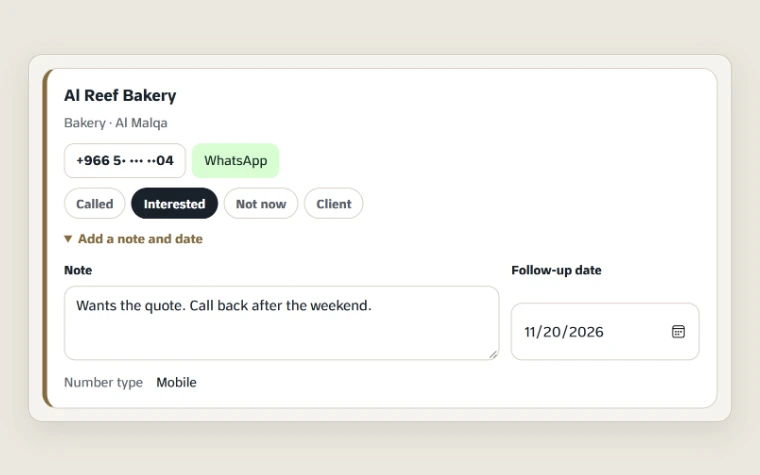
After each call, write a line on what happened and set a date to get back to them. On that day, the business shows up in “Today”.
“Today” and your progress
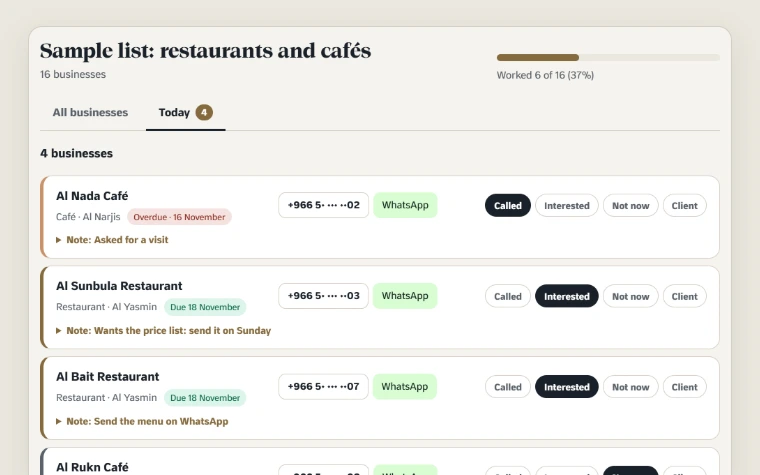
Open “Today” every morning to see the businesses due today, and the ones past their date, marked “Overdue”. A bar above the list shows how many businesses you've worked and what share of the list that is, so you know where you stand.
One-tap calls and WhatsApp
The business's number is a call button, and the WhatsApp button opens one chat with one business. There's no bulk sending. Introduce yourself in your first message, and never message again anyone who says no.
The number cleaner
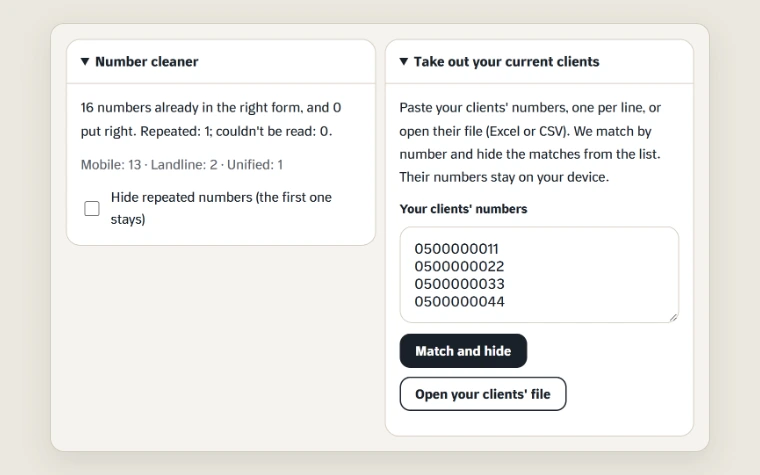
The tool puts Saudi numbers in +966 form, tells mobiles from landlines and unified numbers, and counts the repeats, which you can hide in one tap. The “Number type” filter lets you start with the mobiles, or with the landlines.
Take out your current clients
Paste your clients' numbers or open their file, and the tool hides the matches, so you never pitch a client as if they were new. Their numbers stay on your device too.
Export your work
Export what's on screen to an Excel file with your statuses, notes and dates, or to your phone's contacts. Open an Excel file you exported, and its marks come back in the tool.
How to use the Customer follow-up tool
- Download your list file: from “My lists” after you buy, or from your free sample email.
- Open it in the tool: press “Choose the file”, or drag and drop it onto the page.
- Filter where to start: a district, a subcategory or a number type, or search by name and number.
- Reach out and mark: call or open WhatsApp, then pick the status and add a note and a date.
- Start your day from “Today”: what's due and what's overdue, in one place.
- Export a copy now and then: an Excel file from “All businesses” with no filters keeps your work safe if you change devices.
What the tool gives a sales team
Split the list between your reps before you start, by district or subcategory. Each rep opens their share on their own device and works it with the same statuses. At the end of the week, each one exports their file, and you combine them in the team's file to review results.
| What the team needs | From the tool |
|---|---|
| One owner per business | Each rep opens only their share of the list |
| One language for results | The same statuses for everyone: called, interested, not now, client |
| A weekly review | An Excel file from each rep, with statuses, notes and dates |
| No calls to current clients | “Take out your current clients” before a rep starts |
With every list update, open the new copy on the same device: the tool knows the list, and your marks stay on their businesses. Keep one opening script for the team: each rep introduces themselves, and anyone who asks not to be contacted comes off the team's file straight away.
Your file stays on your device
The tool reads the file in your browser and saves it in that browser, on that device. It's never uploaded to us or anyone else, and there's no account or sync.
- You can open more than one list, and come back to them from “Lists open on this device”.
- If you clear your browser data or change devices, open the Excel file you exported and your marks come back.
- You can delete one list from the device, or clear all the tool's data in one tap.
Try it on a demo list
Before you open your own list, try the tool on a demo list: set statuses, write a note, pick a date, and look at “Today” and the exports. You'll see what the file looks like and what the tool does, and none of your files change.
Try the tool before you startA demo list ready in the tool, to try statuses, notes, “Today” and exports.
Try it on a demo list →No list yet?
| Service | Suits you if |
|---|---|
| Free sample | You'd like to try the tool on a real file. Open an updated list's page, see ten of its businesses, and ask for the sample file by email. |
| Ready lists | You know your customers' activity and city. The file is yours as soon as you pay, in Excel and CSV, and opens in the tool as it is. |
| Custom list | You target a type of business with no ready list. Tell us the type and the city, and we'll prepare it for you. |
Frequently asked questions
Before you start
Is the Customer follow-up tool free?
Yes, free and with no account. Open the page, choose your list file and start following up your businesses from your browser.
Is my list file uploaded to your site when I open it in the Customer follow-up tool?
No. The Customer follow-up tool reads the file in your browser and saves it on your device only. It's never uploaded to us or anyone else, and we never see it.
Which files open in the Customer follow-up tool?
An Excel file in .xlsx form or a CSV file, up to 40 MB, with a business name or contact number column and at least one more. Save an old Excel file (.xls) as .xlsx first, then open it.
How do I follow up leads in the Customer follow-up tool?
Mark each business with a status (called, interested, not now or client), add a note and set a follow-up date. Each morning, open “Today” to see what's due and what's overdue.
If I change devices or clear my browser data, do I lose my marks in the Customer follow-up tool?
Not if you keep a copy. Now and then, export to Excel from “All businesses” with no filters, then open that file in the tool on any device and its marks come back.
Is the Customer follow-up tool a replacement for a CRM?
It's a simple tracker for one person on one device, free and with no account. It doesn't sync between devices, so if your team works on one shared file at the same time, use a CRM: your list file comes as a CSV, which most systems accept.
Read next
Ideas to start with

Cold calling: how to grow sales one call at a time
Cold calling businesses: how to prepare your list and the call's goal, the first ten seconds, ready answers to objections, and the numbers to measure.

The art of cold outreach to new customers
Cold outreach to new customers: 5 principles for a message or call that opens a door, a clear follow-up sequence, and how to handle replies and a no.

Buying a customer database: 7 questions before you pay
Before you buy a customer database, ask 7 questions: where the data comes from, when it was updated, how many have WhatsApp, and what if numbers are wrong.